
Prerequisite:
The user must be added to the MediasiteAdmin role to access the CLE tab of the product.
To navigate to the setup page:
- Create the product in either the staff site or desktop.
- Log into the staff site
- Navigate to Commerce > Find Products
- Search for the product and click the link to go to the product page
- Click on the CLE tab.
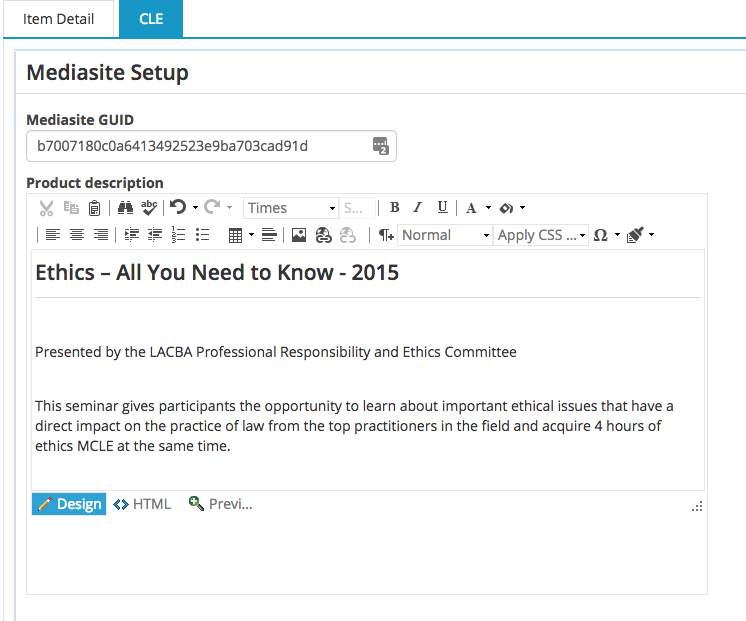
- If this product has a Mediasite link, you can paste the mediasite GUID into the first field.
- The product description has a WYSIWYG editor so formatting can be applied easily to the description of the product.
How to set up CLE credits for the product
- On the CLE tab, scroll down to the CLE Definition section
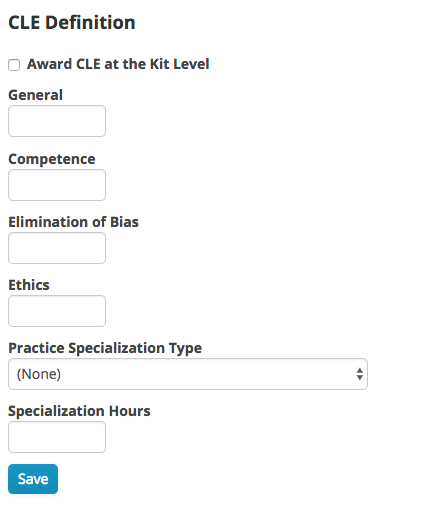
- If this product is a kit and all of the CLE credit is awarded at the kit level, check the Award CKE at the Kit Level checkbox. Do not check this box for the child products within the kit.
- Enter the hours for each type of credit awarded for the product. If no hours are awarded, enter 0.
- If Practice Specialization credit should be awarded, choose the practice specialization type from the dropdown list and enter the number of hours to be awarded in the Specialization Hours box.
Comments
0 comments
Please sign in to leave a comment.