
Why schedule the project?
Scheduling the project sets the due dates for all non-completed tasks. The schedule is based on each task's dependent task's due date.
See "How a due date is calculated" for more information.
Step 1: Set the event date
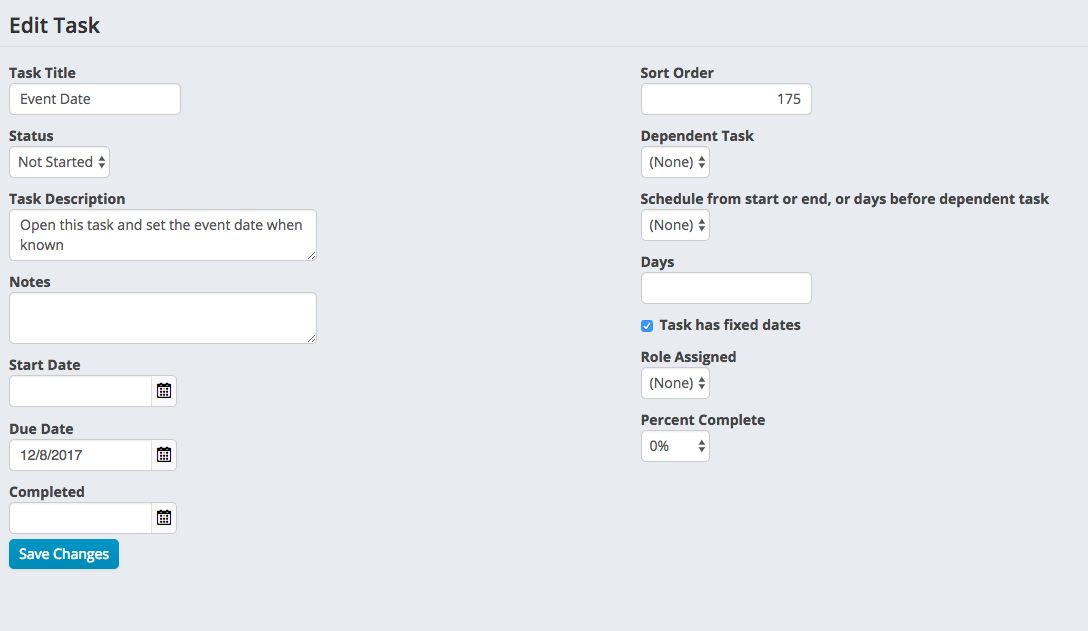
Some tasks in the project are scheduled based on the event date. Before scheduling the project, you first need to find the task called Event Date. Click on the task title to edit the task.

On the Edit Task screen, set the Due Date field to be the date of the event. Then press Save Changes.
Step 2: Schedule the project
On the top right corner of the screen, press the schedule project button.

Once the project is scheduled, review the due dates. You can make adjustments to any tasks and re schedule the project if needed. Keep in mind that tasks which have "Task has fixed dates" checked, do not get scheduled.
Comments
0 comments
Please sign in to leave a comment.